


A digital signature is a way for individuals and organizations to know whether something can be trusted. Digital signatures bring digital trust into the fold by providing authenticity and integrity to everything, from PDF invoices from vendors and emails from colleagues to the software apps you install onto your computer and the connections that secure them.
All of this brings to mind the question: What happens during the digital signature creation process?
It’s time to break down how digital signatures are created, so you’ll understand what goes on in the background as you complete the everyday activities in your online life.
Related Resource: How Do Digital Signatures Work? A Look at How a PKI Signature Works
How Are Digital Signatures Created? An Overview of What’s Involved
The digital signature creation process begins with six key elements:
- The data you want to digitally sign (i.e., input data)
- Two cryptographic functions (encryption and hashing)
- A PKI digital signing certificate (e.g., an SSL/TLS server certificate, code signing certificate, email signing certificate, document signing certificate, etc.)
- A cryptographic key pair (containing two keys) that’s associated with the certificate:
- one private key, which encrypts the hash digest data in order to create the digital signature.
- one public key, which decrypts the digital signature and enables recipients to calculate the hash digest for verification purposes.
- A hash digest (which results when you combine the input data with the private key)
- A digital timestamp (optional), which extends the life of your digital signature
Alright, now it’s time to start your clock as we quickly explore how all these things come together.
A 60-Second Look at How to Create a Digital Signature
- Apply the one-way function (hash) to the input data. This process converts any size input into a fixed-length string of gibberish that’s called a hash digest or hash value. (NOTE: If even one bit [literally] of the data is changed after the digital signature is applied, then the hash value changes entirely.)
- Encrypt the resulting hash value using the signer’s private key. This is how digital signatures are created. In this case, the encryption isn’t protecting data confidentiality; it’s about proving that you were the one who actually signed it and not an imposter (because only you should have access to your private key).
- Attach a timestamp during the digital signature creation process. A timestamp extends your digital signature’s validity far beyond the signing certificate’s validity period, so long as the certificate doesn’t get revoked.
- Attach the signing certificate and public key to the digitally signed data. The certificate, which is issued by a trusted CA and is associated with your personal or organization’s verified digital identity, validates the authenticity of the signing key.
Here’s a look at how the digital signature creation process works:
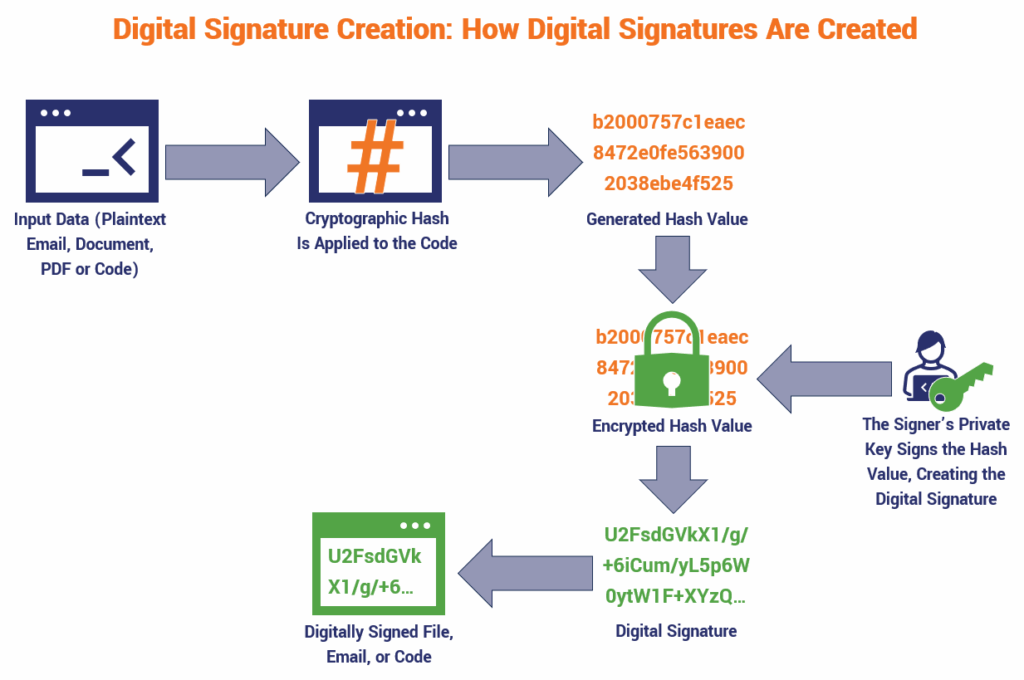
Stop the clock. That’s it! Your digital signature has now been created.
You’ve also provided recipients of your digitally signed emails, documents, or software applications with the tools needed to verify their authenticity and integrity.
How the Digital Signature Creation Process Benefits Recipients
Your recipient can use the signer’s public key to decrypt the signature. Then they can calculate the hash value and compare it to the original hash value (which you should publish publicly) to see whether they match.
If they match, then all is good. The user or client will know that the file, email, or software app is authentic and hasn’t been tampered with since it was signed. If the hash values don’t match, then they will know that the data has been altered since it was digitally signed.