





Reminder: SSL Certificate Validity Is Dropping to 200 Days
Certificate validity periods are getting shorter — is your team ready to keep up with the new demands? Two options for managing shorter certificates…
There’s no way around it — certificate lifespans are getting significantly shorter:
- Validity periods for SSL/TLS certificates will be nearly halved from 398 days to 200 days before March 15, 2026. This move is coming slightly sooner than expected, with some certification authorities (CAs) implementing their shifts to 200-day validity as soon as Feb. 24.
- Validation data reuse periods will also be reduced. Certification authorities will have to re-verify your information significantly more frequently.
Just to be clear, this does NOT mean that you’ll need to purchase twice as many SSL certificates — you’ll just need to reissue (which is free) and reinstall your SSL certificate twice as often.
Here’s what you need to know about the coming changes, and what new SSL certificate automation tools we’re rolling out to help you.
Let’s hash it out.
A Quick Review of Planned SSL Certificate Validity Reductions
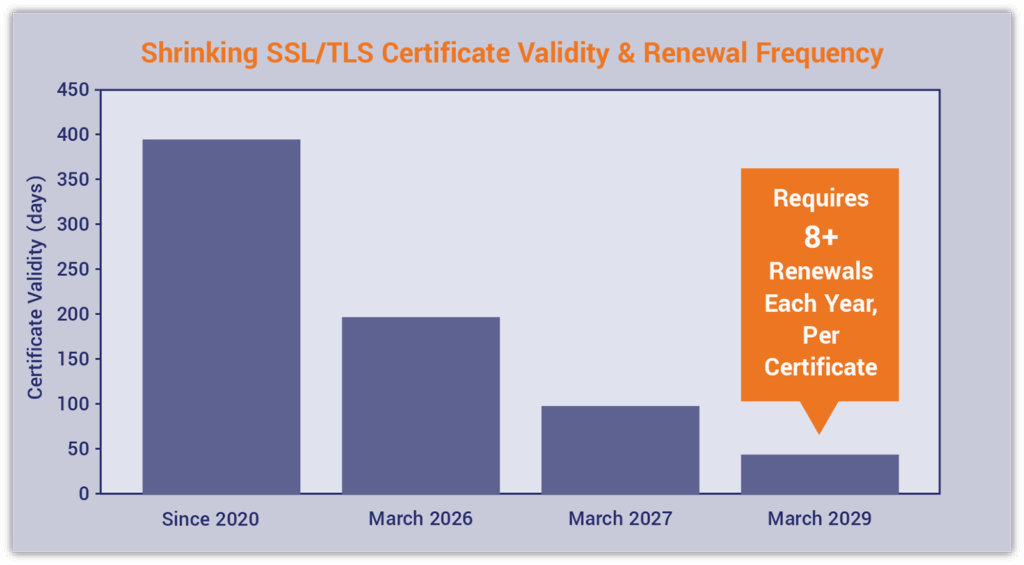
Here’s a quick overview of what the reduced certificate validity phases look like, based on the CA/Browser Forum’s mandated maximum certificate validity periods’ effective dates:
| Certificate Lifespans (Max # of Days) | Certificate Renewals/Re-Issues (# Per Year) |
| 398 days (current) | ~1 |
| 200 days (starting February/March 2026) | ~2 |
| 100 days (starting March 15, 2027) | ~4 |
| 47 days (starting March 15, 2029) | ~8 |
If you’d like to dig into more details on why these changes are being made, check out our blog post, Industry to Shift to 47-Day SSL/TLS Certificate Validity by 2029.
As is typical with changes to industry requirements, certificate authorities are implementing slightly more restrictive rules to prevent unexpected issues. Here’s a quick breakdown of how the changes will unfold for DigiCert & Sectigo:
| CA | Certificate Validity Changes | Domain Validation Data Reuse Changes | Effective Date |
| DigiCert | Certificate validity drops to a 199-day maximum | Domain validation (DV) reuse period drops to 199 days | For certificates issued on or after Tuesday, Feb. 24, 2026 |
| Sectigo | Certificate validity drops to a 199-day maximum | DCV data reuse drops to 198 days | For certificates issued on or after Thursday, March 12, 2026 |
Two Options for Managing Shorter Certificates
Essentially, there are two ways to deal with the decreasing certificate lifespans:
1. Reissue + Reinstall Certificates Manually Every Six Months
You can continue purchasing the same SSL/TLS certificates you do now. For example, you can still purchase one- and three-year coverage for each certificate. However, you’ll have to manually reissue and reinstall each certificate (at no additional cost) every 199 days (~six months).
So, what’s this process look like? Let’s re-hash them:
- Generating and submitting a certificate signing request (CSR)
- Completing the domain- and/or organization validation process(es)
- Retrieving the SSL/TLS certificate
- Installing the SSL/TLS certificate
- Renewing the certificate before it expires
If you choose this manual approach, ensure your reissuance notifications are enabled. While the inundation of notifications may drive you a bit crazy, it’s still better than having your certificates expire and cause outages.
2. Let SSL Automation Handle It
SSL/TLS certificate automation solutions handle your certificate reissuances, renewals, and installations (and everything in between). You can set up your SSL/TLS certificate once and not worry about it again, even as validity periods continue to decrease over time.
4 Options for SSL Automation
We offer multiple certificate automation solutions that can help you eliminate manual tasks and streamline your SSL lifecycle management, whether you have one certificate or 100:
| AutoInstall SSL® for Linux and Windows | AutoInstall SSL® for Web Hosts | ACME-Enabled SSL Certificates | Certificate Lifecycle Management Platforms | |
| Who It’s For | Website owners using cloud/VPS/ dedicated Linux and Windows servers | Web hosting providers | Website owners who use a variety of environments | Website owners managing complex environments and custom integrations |
| Compatible Platforms | Linux (Apache & NGINX) and Windows IIS | cPanel, DirectAdmin, Plesk, and WHMCS | cPanel, Kubernetes, Linux, Plesk, Windows IIS, and other major servers | Supports a wide variety of environments |
| Features |  Full lifecycle automation Full lifecycle automationBuilt-in monitoring & email alerts One-time installation (auto-renews 28 days before expiration after that) Intuitive user interface Easy setup wizard | Full lifecycle automation Built-in alerts Multi-year SSL reissuances WYSIWYG interface for your customers | End-to-end SSL automation Built on the globally trusted ACME protocol Fast and easy setup with ACME agents available for most servers | Automated certificate discovery, issuance, deployment, renewal, and revocation that eliminates manual management Centralized interface for managing certificates Advanced management tools & controls |
| Pricing | Starting at $18.96/year | Available for Partners | Starting at $75/year | Starting at $2,500/year |
| Learn More | Learn More | Learn More | Learn More |
Be sure to monitor your certificates as well. Installing certificates won’t do you (or your customers) any good if you don’t bother ensuring they’re active and issue-free.
It’s Time for a Little Exercise…
How much does manually managing your SSL/TLS certificates cost your business?
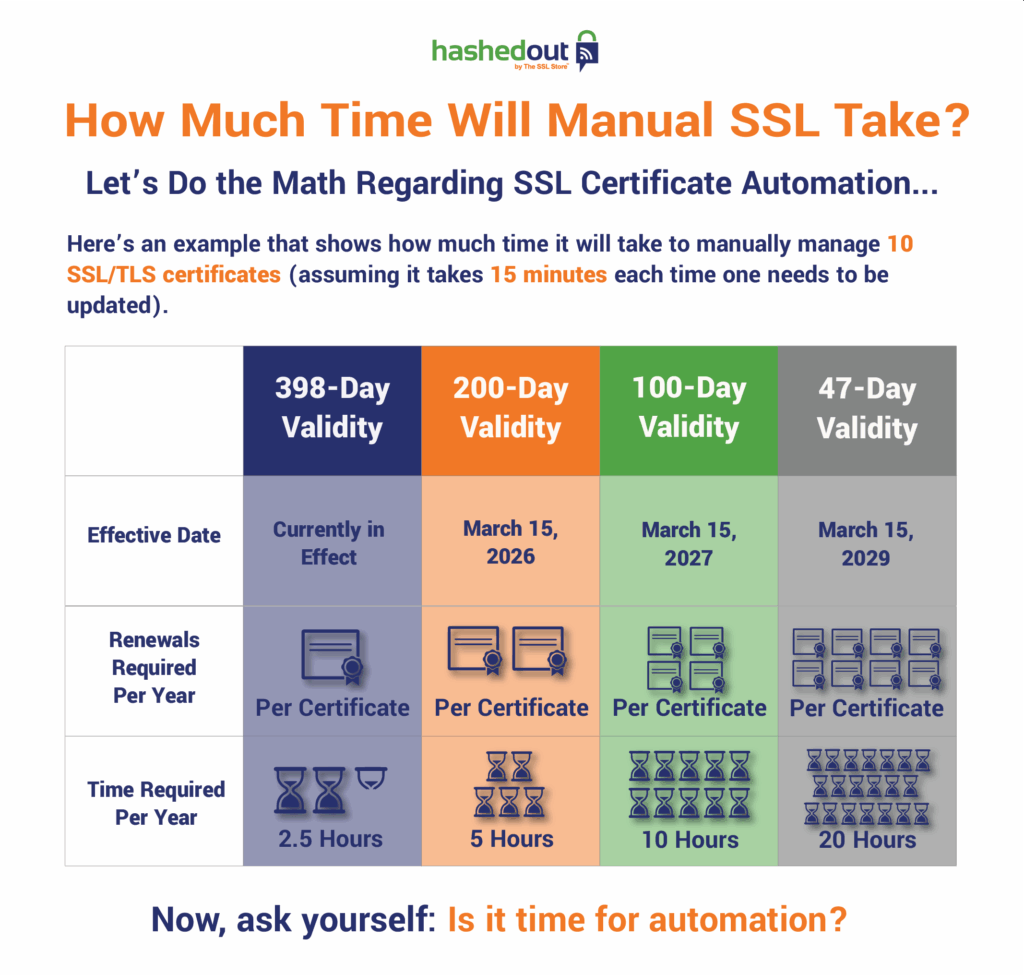
What all of this means is that by March 2029, you’ll have to dedicate a minimum of 2.5 eight-hour workdays every year strictly to reissuing and installing 10 SSL/TLS certificates. And that number is provided you don’t have other compounding factors, such as:
- having more than 10 certificates to manage, and/or
- dealing with additional SSL reissuances or revocations throughout the year.
Imagine what you could do with all of that time if your organization had chosen to automate these tedious tasks…



5 Ways to Determine if a Website is Fake, Fraudulent, or a Scam – 2018
in Hashing Out Cyber SecurityHow to Fix ‘ERR_SSL_PROTOCOL_ERROR’ on Google Chrome
in Everything EncryptionRe-Hashed: How to Fix SSL Connection Errors on Android Phones
in Everything EncryptionCloud Security: 5 Serious Emerging Cloud Computing Threats to Avoid
in ssl certificatesThis is what happens when your SSL certificate expires
in Everything EncryptionRe-Hashed: Troubleshoot Firefox’s “Performing TLS Handshake” Message
in Hashing Out Cyber SecurityReport it Right: AMCA got hacked – Not Quest and LabCorp
in Hashing Out Cyber SecurityRe-Hashed: How to clear HSTS settings in Chrome and Firefox
in Everything EncryptionRe-Hashed: The Difference Between SHA-1, SHA-2 and SHA-256 Hash Algorithms
in Everything EncryptionThe Difference Between Root Certificates and Intermediate Certificates
in Everything EncryptionThe difference between Encryption, Hashing and Salting
in Everything EncryptionRe-Hashed: How To Disable Firefox Insecure Password Warnings
in Hashing Out Cyber SecurityCipher Suites: Ciphers, Algorithms and Negotiating Security Settings
in Everything EncryptionThe Ultimate Hacker Movies List for December 2020
in Hashing Out Cyber Security Monthly DigestAnatomy of a Scam: Work from home for Amazon
in Hashing Out Cyber SecurityThe Top 9 Cyber Security Threats That Will Ruin Your Day
in Hashing Out Cyber SecurityHow strong is 256-bit Encryption?
in Everything EncryptionRe-Hashed: How to Trust Manually Installed Root Certificates in iOS 10.3
in Everything EncryptionHow to View SSL Certificate Details in Chrome 56
in Industry LowdownA Call To Let’s Encrypt: Stop Issuing “PayPal” Certificates
in Industry Lowdown